


How to Backtest a Trading Bot Before You Automate It
A trading bot repeats the same rules on every signal. Before it does that with your money, replay the rules on the past: the same signals, your entry settings, your capital. This is how the backtest of a Desk works in the GGShot Mini App, and what to read in its result.
What Goes Into the Test
- The desk: the set of strategies whose signals the bot will trade.
- The Entry Preset: market or limit entry, one level or up to four levels inside the entry zone, the split across TP1–TP4, the stop rule, position size and leverage.
- Capital and the maximum number of positions open at once.
- The period: 30D, 90D, 180D, 1Y or custom dates.
What Makes a Backtest Honest
- 1-minute candles. Every trade is replayed minute by minute, so the order in which the stop and the targets were reached is taken from the price, not assumed.
- Fees. Each entry and exit pays the exchange fee.
- Funding. A perpetual position pays or receives funding while it is open.
- Entry delay. The order is sent after the signal, not at the signal's price.
- Slippage. A market order fills worse than the last price.
A test without these costs shows a result no account will repeat. The more often a bot trades, the more fees and slippage decide the outcome.
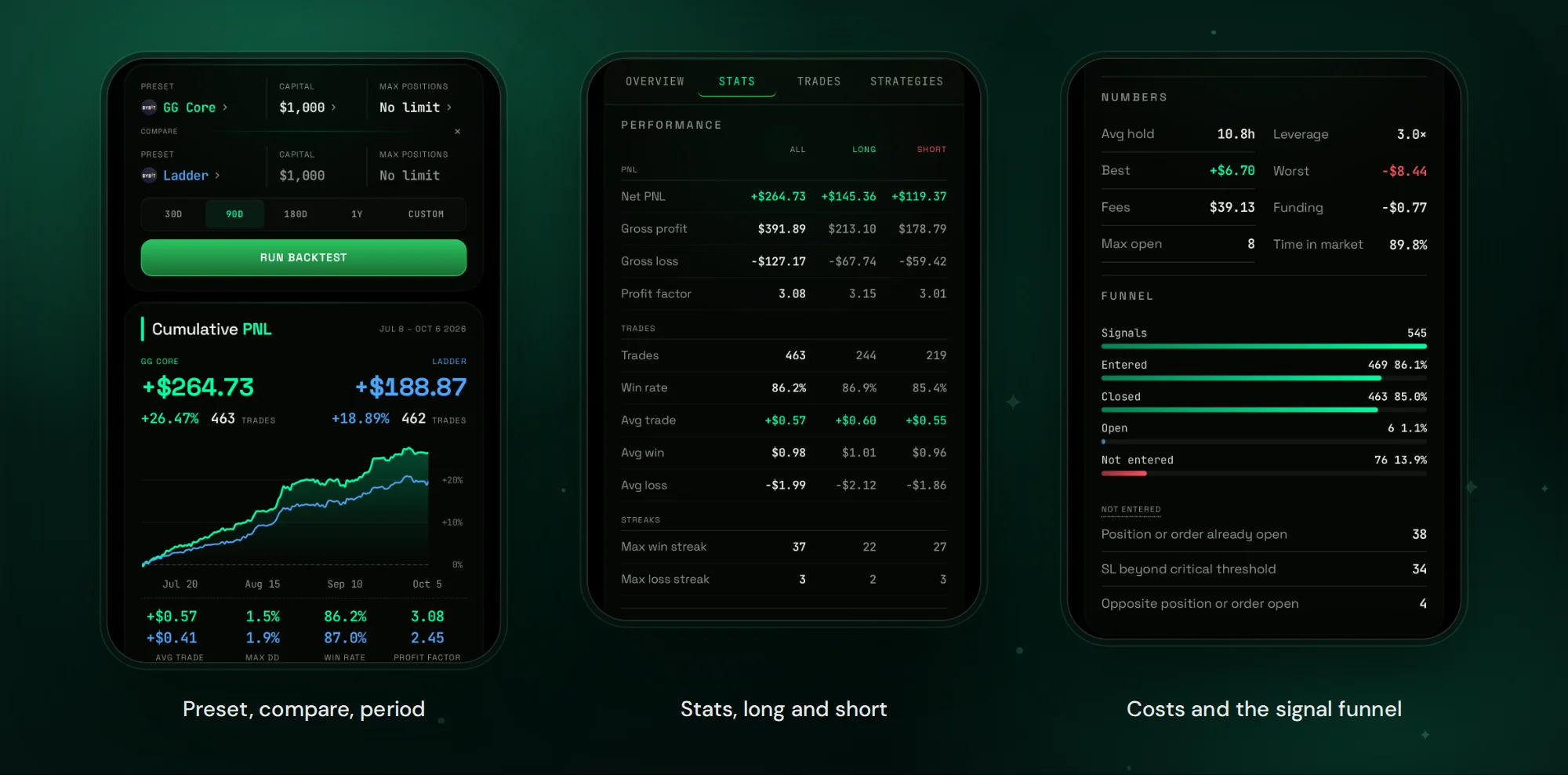
How to Read the Result
- PNL over the period, with the curve: a steady line says more than the final number.
- Maximum drawdown: the deepest fall from a peak. This is what the same settings would have asked you to sit through.
- Win rate and profit factor: gross profit divided by gross loss.
- Long versus short: whether one side carries the result.
- Skipped signals: the reason every signal that was not entered was skipped.
Compare Two Presets
+ COMPARE runs a second preset on the same desk and period. Change one thing at a time: the stop rule after TP1, the number of entry levels, the leverage. The difference between the two curves is the effect of that one setting. Stop rules are covered in Move Stop Loss to Break-Even After TP1: Stop Rules for a Trading Bot.
What a Backtest Cannot Tell You
- It is a historical simulation, not a forecast.
- A period with one kind of market says little about another. Test 90D and 1Y, not only the last month.
- A desk picked because it looked best on the tested period will look worse outside it. Keep the choice simple.
From Backtest to Automation
- Run the backtest with the preset you plan to use.
- Compare it with one alternative.
- Open the desk, tap Automate, choose the preset and the account, check margin per trade and tap Start.
- Every new signal of the desk is entered with that preset. Signals issued before Start are not taken.
FAQ
Which exchanges does the backtest cover?
Bybit and Hyperliquid, each with its own fees and funding.
Can I backtest stocks and gold?
Yes. A desk of stock or commodity strategies is tested the same way. See Stock Trading Signals in Telegram and Gold Trading Signals in Telegram.
Why do skipped signals matter?
They show how much of the desk your capital and position limit can actually trade.
Get Started
Open @GGShot_Bot, launch the Mini App, open a desk in the Desks tab and tap Backtest. Every setting is described in the GG-Shot Auto-Trading: Complete Guide.